
Arena Breakout Infinite Cheats — Aimbot, ESP & Loot Value Reads for ABI Full
ABI Full: aimbot with visible check, smoothness, and bone targeting, player and AI ESP with inventory price and squad reads, world corpse ESP with minimum price filter, combat mode, no recoil, and FOV control on Windows 10 and 11.

Arena Breakout Infinite
Arena Breakout Infinite Cheats
Everything you need.
Aim tools, player ESP, loot reads, and comfort features — each tunable to your playstyle and built to keep the screen as clean or as detailed as you want it.
Aimbot
Tune ABI Full with visible check, ignore knocked, target line, draw FOV, max distance, custom keybind, filters, smoothness, speed, and FOV.
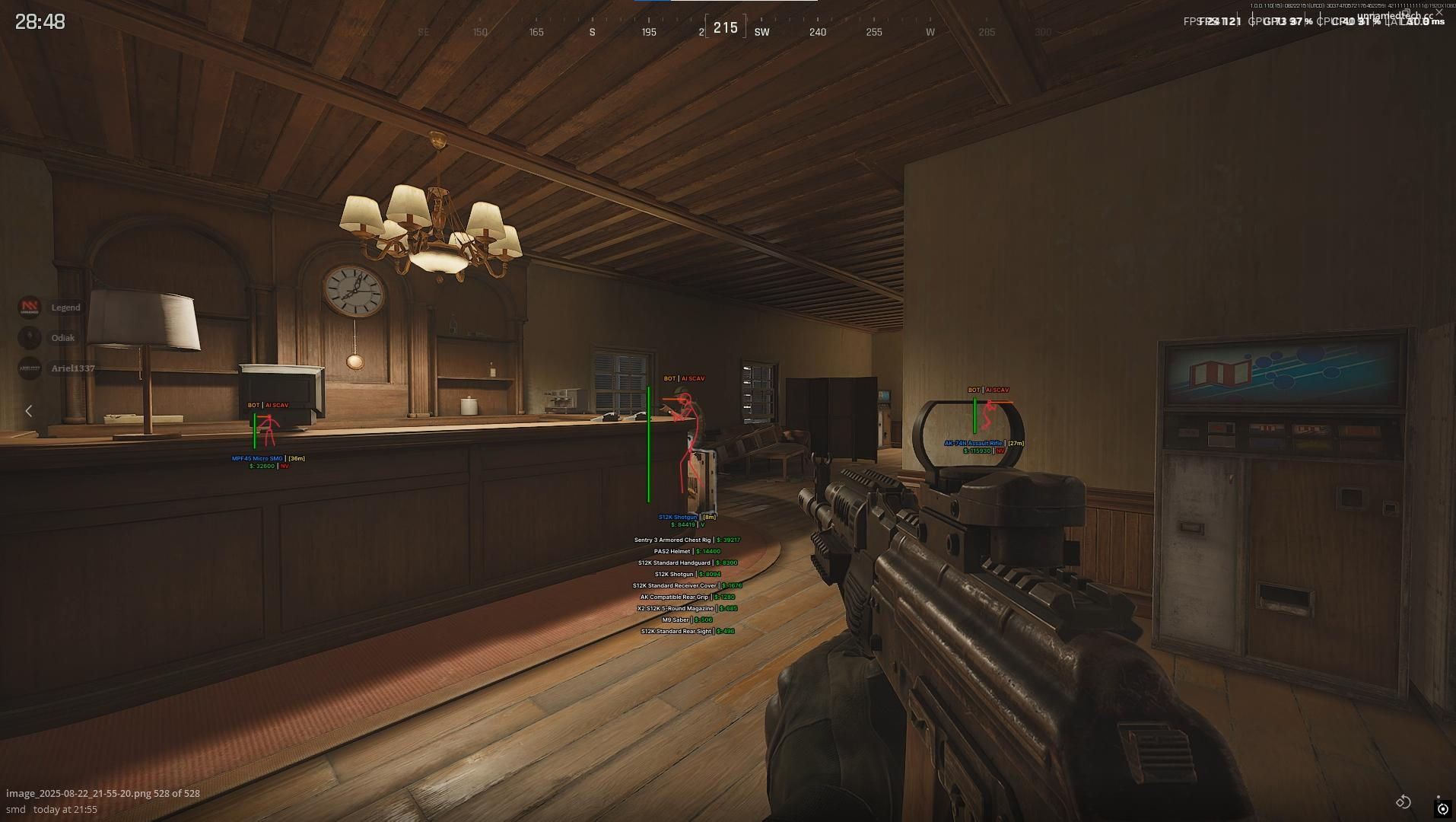
Player ESP
Read enemy players with inventory list, box, distance, name, team index, weapon type, view direction, health bar, head circle, snaplines, skeleton, inventory price, and level.
AI ESP
Track AI with box, visible check, distance, name, weapon type, view direction, health bar, head circle, snaplines, skeleton, inventory list, and inventory price.
World & Misc
Use player corpse and AI corpse ESP with name, distance, price, inventory list, max distance, minimum price, no recoil, FOV changer, crosshair, font size, and combat mode.
Full Play Mechanics
A detailed breakdown of every feature, how it works in real matches, and how to set it up for your playstyle.
Arena Breakout Infinite cheats for cleaner raids, smarter loot decisions, and better aim in every extraction
Arena Breakout Infinite cheats from Cheesysproducts cover ABI Full — the single product in the live ABI category. ABI Full gives you aimbot with visible check, ignore knocked, target line, FOV draw, max distance, keybind, filter, smoothness, speed, and FOV. Player ESP with inventory list, box, visible check, distance, name, team index, weapon type, view direction, health bar, head circle, snaplines, skeleton, inventory price, level, and side. AI ESP with the same depth. World corpse ESP for both player and AI corpses with price, inventory list, min price, and max distance. Misc tools: no recoil, FOV changer, crosshair, ESP font size, and combat mode to hide world ESP during fights. Windows 10 and 11, Intel and AMD.
Arena Breakout Infinite is built around risk, value, and the constant pressure of deciding whether a fight is worth taking. Every second in a raid has a cost — committing to the wrong angle costs your kit, checking low-value loot costs your extract window, and staying too long in a zone costs your position. ABI Full covers the information and aim layer simultaneously: you see more, shoot better, and make better decisions about when to fight and when to rotate.
Aimbot: tunable controls for fights under pressure
Raids create different kinds of fight pressure. Holding a tight angle after a staircase push is a different problem from tracking a player crossing open ground, and both are different from reacting to an AI that appeared from behind a crate. ABI Full's aimbot is built for adjustment — not a single fixed profile that only works in one scenario.
Aim feel: smoothness, speed, and FOV
Smoothness and speed shape how the correction feels during movement. High smoothness produces gradual micro-adjustments that integrate naturally with your own mouse input — useful for mid-range fights where aggressive snapping looks wrong. Lower smoothness with higher speed suits close-range engagements where the target is already inside CQB range and response time matters more than subtlety. FOV sets the acquisition cone: tighter FOV keeps the assist focused on targets directly ahead, wider FOV helps at ranges where targets have more lateral drift. Draw FOV renders the active cone on screen so you can verify it is aligned before a fight starts.
Target selection: visible check, ignore knocked, filter, max distance
Visible check prevents aim assistance from activating through walls and cover, which keeps behavior cleaner in spectator views and avoids wasting the assist on targets you cannot actually see. Ignore knocked removes downed players from the target pool — a player who is already knocked is not the active threat, and continuing to aim at them while their squadmates are shooting is counterproductive. Filter gives you additional control over which targets qualify. Max distance sets a ceiling beyond which the aimbot does not engage — useful for keeping the assist inside the range where your actual weapon effective is meaningful. Draw target line overlays an on-screen line from your position to the active target, giving you a visual read on whether the selection makes sense before you fire.
Player ESP: inventory reads, threat awareness, and fight selection
Player ESP in ABI Full is not limited to simple boxes. The full list — inventory list, inventory price, box, visible check, distance, name, team index, weapon type, view direction, health bar, head circle, snaplines, skeleton, level, and side — is designed around the decisions that actually determine whether a fight is profitable.
Value reads: inventory list, inventory price, weapon type, level
Inventory list and inventory price give you the data to decide whether a fight is worth committing to before you start it. A player carrying high-value gear in a risky position is a different decision from a player carrying low-value gear from a favorable angle — and knowing the difference before you engage is one of the most consistent advantages ABI Full provides. Weapon type changes your assessment of threat severity instantly: a player with a high-tier rifle is a different risk from someone who only has a pistol. Level adds context without being definitive — it can inform your read on whether a player is experienced or careless, but it is the inventory value and weapon type that actually drive fight commitment decisions.
Positioning and threat reads: skeleton, health, view direction, distance, arrows
Skeleton gives posture and movement context — crouching, peeking, repositioning. Health bar tells you whether a player is already damaged, which changes whether you need to commit or wait. View direction shows which way the target is looking, which determines timing: a player looking away gives you a window, a player looking toward you means the fight is already starting. Distance tells you whether pressure is immediate or still developing. Snaplines anchor each player to a screen-edge indicator so you can maintain awareness of multiple targets during overlapping encounters. Head circle ensures the head hitbox stays readable even under movement.
Squad and visibility reads: team index, visible check, side
Team index tells you whether you are dealing with a solo player or part of a coordinated squad — one of the most important decisions in extraction is whether to push or wait, and squad composition drives that call. Visible check separates players who can currently see your position from players who are behind cover — visible players require an immediate response, invisible players are a positioning read you can use to route around them or prepare. Side identifies faction, useful for filtering threat level in zones where some factions are more likely to be hostile than others.
AI ESP: separating ARC pressure from player pressure
AI ESP in ABI Full covers the same depth as player ESP: inventory list, box, visible check, distance, name, weapon type, view direction, health bar, head circle, snaplines, skeleton, and inventory price. The reason depth matters here is that AI pressure and player pressure often overlap in Arena Breakout Infinite — an active ARC encounter can mask the sound of a player rotating toward you, and player contact during an AI fight is one of the most common causes of unexpected wipes.
Threat triage: distance, weapon type, view direction, health
AI distance, weapon type, and view direction give you enough information to decide in real time whether an AI is part of your immediate problem or background noise you can ignore temporarily. A nearby AI looking directly at you while a player is already pushing from a different angle means you need to clear the AI first. A distant AI that is not facing your position can be deprioritized. Health bar determines whether clearing a specific AI requires one shot or a sustained burst — useful for deciding how much time and ammunition an AI is worth before you move on.
Loot decisions: inventory list, inventory price
AI inventory list and price help when you are deciding whether to stop and loot after a clear. Not every AI corpse is worth the time and position cost. If the inventory is low value, you keep moving. If it contains something meaningful — a weapon part, a high-tier vest, an item that completes a current objective — you make the call to stop. Having that read before you walk over the corpse means you never waste time crouching over a body that has nothing worth taking.
World corpse ESP: value filters for disciplined extraction loot
World ESP in ABI Full is focused specifically on corpse value — player corpses and AI corpses, each with independent toggles. Per category: name, distance, price, inventory list, max distance, and minimum price. This is the feature set that directly supports the extraction pacing that determines whether a raid ends with strong value or a risky overstay.
Minimum price filter and max distance
Minimum price is the most operationally useful setting in the world ESP section. Arena Breakout Infinite can scatter a large number of corpses across a raid zone — some from your fights, some from earlier squads, some from AI encounters. Without filtering, every corpse is a visual prompt that pulls your attention. With a minimum price threshold set to match your extraction goals, only corpses carrying meaningful value appear. If you are late in a raid and prioritizing extraction, raise the threshold so only high-value corpses register. If you are early and willing to check more, lower it. Max distance per category keeps corpse markers tied to your actual route rather than showing the entire map.
Player vs AI corpse separation
Player corpses and AI corpses serve different tactical purposes. Player corpses indicate recent fights, possible gear upgrades, and potential active threats still nearby. AI corpses are lower-priority loot opportunities that may still contain useful items. Separate toggles mean you can run player corpse ESP permanently while toggling AI corpse ESP based on whether AI loot is part of your current raid goal — a flexibility that is not possible if both are grouped under a single world ESP switch.
Misc tools: no recoil, FOV, crosshair, font size, combat mode
No recoil removes the vertical and horizontal weapon kick that makes sustained fire inaccurate at range — particularly relevant in ABI where long-range fights through narrow corridors and across open areas are common. FOV changer adjusts the camera field of view to a setting that feels more comfortable based on your screen and play distance. Crosshair adds an always-visible center point regardless of the in-game crosshair state, which matters when iron sights or certain weapon types obscure your natural point of aim.
ESP font size is more important than it sounds in ABI Full because the overlay displays name, distance, inventory price, team index, weapon type, health, and level simultaneously. If text is too large, it blocks the game. If it is too small, you miss the reads when the raid gets fast. Font size lets you calibrate the overlay to your display so information stays legible without competing with what is happening on screen.
Combat mode is the control that changes the most about how the product feels over a full raid session. World corpse ESP is useful during loot phases and movement phases — you want to see what is on the ground when you have the attention to act on it. During an active fight, that same corpse information becomes visual noise that competes with player information when threat decisions need to be instant. Combat mode hides world ESP during fights and restores it when fights end, so the screen state matches the raid state rather than staying the same regardless of what is happening.
Setup guide by raid approach
- Cautious solo loot run: player ESP with box, distance, health, weapon type, and inventory price at moderate range. World corpse ESP with minimum price set high to reduce visual noise. Aimbot at conservative FOV with visible check on and smoothness set high. Combat mode to clear the screen when contact starts. AI ESP with distance and view direction for threat awareness without full inventory reads.
- Aggressive squad push: team index and squad reads prioritized, view direction widened for flanking awareness, health bars prominent for fight commitment decisions. Aimbot speed increased for faster response in CQB. Combat mode active by default so corpse markers do not compete with player ESP during sustained engagement. AI ESP at moderate range to avoid distraction.
- Value-focused extraction: world corpse ESP with minimum price threshold calibrated to the session goal — higher if you already have strong value, lower early in a raid. Player inventory price prominent for fight selection. AI ESP inventory price enabled to catch high-value AI loot opportunities. Aimbot with max distance set to realistic engagement range so assists stay within the fights that matter.
- All setups: visible check on for both player ESP and aimbot. Set ESP font size before your first real raid — small adjustments make a significant difference in readability under pressure. Keep max distance per ESP category at values that reflect realistic information use, not maximum possible range.
Browse the full Arena Breakout Infinite cheats category, go directly to ABI Full, or visit the Cheesysproducts homepage. For game background, see the official Arena Breakout Infinite site or Arena Breakout Infinite on Wikipedia.
What players are saying.
Verified purchases across every title in the store. No curated highlights — just what customers left on the product pages.
Switched to their DMA setup last month and haven't looked back. The 1 PC to 2 PC transition was completely seamless thanks to the support team. 100% undetected since day one.
Ai aim assist 10/10 works, support guy was very helpful
V9 Ai aim on ps5 wtf lock very good
I tried to buy from many stores before, and the only store you can trust is Cheesy's Products 👑
Honestly the cleanest ESP I've seen in a while. Doesn't clutter the screen during stacked endgames.
Had some trouble getting my custom firmware flashed initially, but the admin jumped in a discord call and walked me right through it in 10 minutes. W service.
Cheesy on top as usual 🤩
Best product I've used for ranked. Settings are dialled in and it runs clean with no drops.
اشكر متعاون جداً وكان معي لين قدرت اركب الهاك
Undetected for 3 months straight, never had a single issue. Support replies fast too.
والله حلو ١٠/١٠ اخذت UAV
Great seller who cares about his customers and the quality of the products.
The edge you've been looking for.
Instant key delivery, Discord support, and software that runs clean. Join 886 players who already made the switch.