
Fortnite Cheats — Aimbot, ESP & Item Radar for Lite and Full
Fortnite Lite and Fortnite Full: weapon-specific aimbot configs, player ESP with rank and platform reads, world ESP with chest and loot filtering, radar with OOF arrows, and combat mode for cleaner fights on Windows 10 and 11.

Fortnite
Fortnite Cheats
Everything you need.
Aim tools, player ESP, loot reads, and comfort features — each tunable to your playstyle and built to keep the screen as clean or as detailed as you want it.
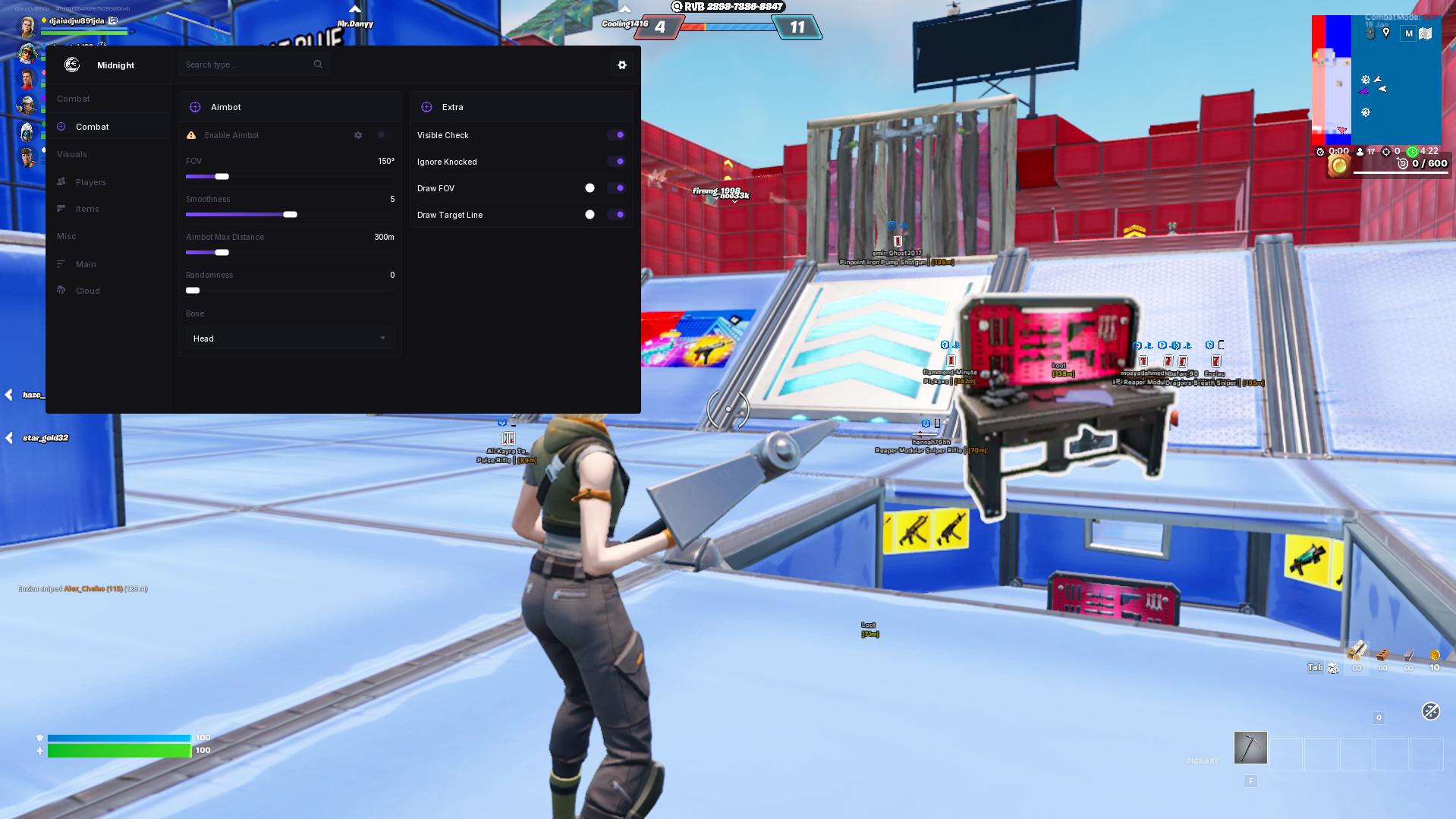
Aimbot
Build a smoother aim profile with weapon configs, prediction, FOV, smoothing, distance limits, visible checks, hitbox choices, and practical keybind control.
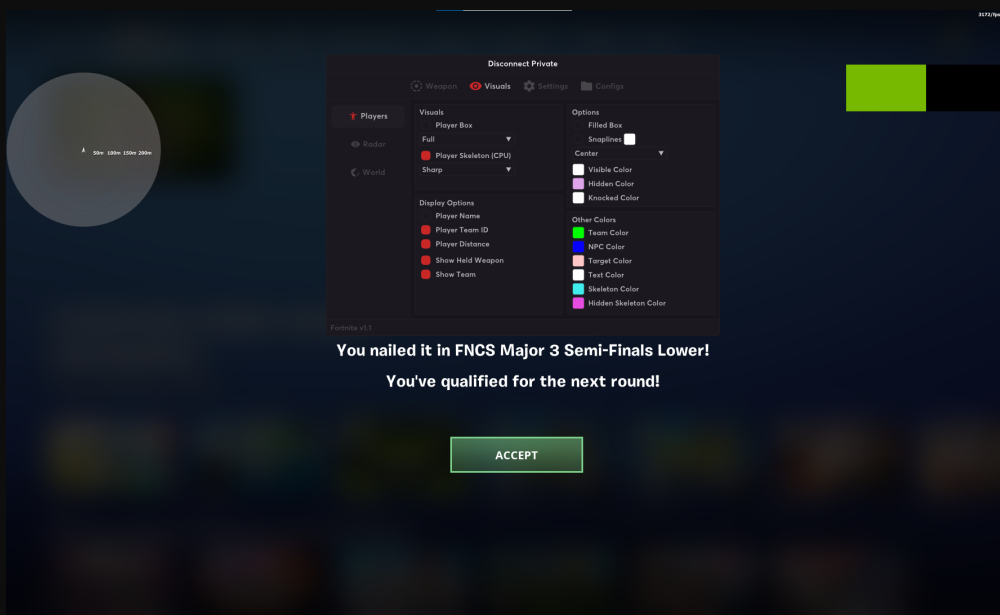
Player ESP
Read players faster with boxes, skeletons, distance, name, team ID, rank, platform, weapon name, snaplines, OOF arrows, and teammate hiding options.
World & Item ESP
Track chests, loot items, ammo, materials, rarity colors, item amounts, looted chest filtering, distance display, and max-distance controls for cleaner routing.
Radar & Combat Mode
Use radar scaling, orientation lock, distance visualizers, battlemode, combat mode, hotkeys, VSync, font sizing, and configs to keep the setup comfortable.
Full Play Mechanics
A detailed breakdown of every feature, how it works in real matches, and how to set it up for your playstyle.
Fortnite cheats for cleaner fights, smarter routing, and better reads across every mode
Fortnite cheats from Cheesysproducts come in two products — Fortnite Lite and Fortnite Full — each covering a different balance of feature depth and setup simplicity. Both products address the same core challenge: Fortnite is not just a shooter. Every match combines aim, edits, builds, movement decisions, item routing, third-party timing, and late-zone pressure. A cheat setup that only helps with aim covers one layer of a six-layer game. Fortnite Lite and Fortnite Full are built to cover more of those layers — aimbot with weapon-specific configs, player ESP with distance and weapon reads, world ESP and item filters for faster loot routing, radar and OOF arrows for off-screen pressure, and combat mode for keeping the screen manageable when a fight goes chaotic.
Buyers searching for Fortnite cheats or Fortnite hacks split into two groups: players who want maximum customization — deep aimbot toggles, triggerbot, radar, item ESP, and VSync — and players who want a cleaner, more organized package with structured player ESP, world ESP, combat mode, and config management. Fortnite Lite is the first. Fortnite Full is the second. Both are covered on this page.
Fortnite aimbot: weapon-specific configs for a game where every fight is different
Fortnite aim is not one consistent skill check. Close-range shotgun fights require fast, controlled corrections with tight FOV. SMG tracking needs smoother mid-range behavior. AR beam fights need distance awareness and prediction for targets behind builds. Using the same aim profile across all three produces a setup that feels wrong as soon as the fight changes. Both Fortnite Lite and Fortnite Full account for this with weapon-specific configuration options, bone selection across head, neck, chest, and pelvis, smoothing and deadzone controls, FOV radius, visible checks, and maximum distance limits.
Weapon configs and per-weapon tuning
Fortnite Lite includes separate weapon configs for each weapon category, letting you run tighter FOV and faster response for shotguns and wider, smoother settings for ARs at range. Fortnite Full adds FOV smoothness from 1 to 10, a distance limit up to 300m, and bone randomization options that vary the aim point naturally across a fight. Splitting your settings by weapon type is the single most effective thing you can do to make a Fortnite aimbot feel natural — the same logic that makes your manual aim feel different depending on the gun applies to the assist.
Smoothing, FOV, and visible checks
Smoothing controls how the assist blends into your own aim movement — high smoothing produces a natural, gradual correction; low smoothing produces a faster, snappier feel that can look unnatural at close range. FOV radius controls the acquisition cone: smaller values keep the assist focused on targets near your crosshair, larger values reach further but increase the risk of snapping to the wrong target in a crowded fight. Visible checks prevent the aimbot from locking onto players behind walls and builds — one of the clearest behavioral tells on any killcam is aim that follows a target through solid cover when no line of sight exists. Keep visible checks enabled.
Prediction in a game of builds and edits
Fortnite players constantly break their own movement patterns with builds, edits, and jumps. A player who throws a wall, edits it open, and peaks has changed direction twice in under a second. Prediction feeds target velocity into the aim assist so it leads the likely exit point rather than reacting to the last known position. In edit-peek situations and in Zero Build slide-and-strafe fights, prediction adds consistency that pure reactive aim misses. Fortnite Lite includes prediction alongside triggerbot controls; Fortnite Full includes FOV circle and target line visualization so you can see exactly where the assist is anchoring before commits.
Player ESP: position reads, weapon checks, and third-party awareness
Player ESP in Fortnite is most useful for two things: knowing where third parties are before they arrive, and knowing whether a push is worth committing to. Both require different information than a standard FPS ESP — Fortnite's build structures create vertical angles and hidden push routes that exist nowhere else, and the third-party meta means a squad appearing on your flank mid-fight is a realistic threat every match.
Box, skeleton, and distance display
Fortnite Lite covers corner boxes and full boxes, multiple skeleton styles, team ID, held weapon, distance, show kills, visible and hidden color separation, knocked color, NPC color, and snaplines. Fortnite Full adds 3D and 2D box options, name display, rank, platform, teammate hiding, and a distance filter up to 1000m. The most practical combination for most players is box or skeleton for position, distance for fight selection, held weapon for threat assessment, and knocked color to avoid wasting attention on downed players. Add rank and platform if you want quick reads on lobby quality.
OOF arrows and off-screen pressure
OOF arrows indicate the direction of an off-screen player — pressure that a camera-restricted view cannot show. In Fortnite this is especially relevant during chaotic end-zones where three squads are stacked in a small area and angles come from above, below, and behind simultaneously. OOF arrows give you just enough warning to reposition before a blind push arrives from outside your current field of view. Fortnite Full includes OOF arrows as part of the player ESP layer, adding a directional awareness tool that pairs naturally with radar.
Color setup and visual discipline
Both products include extensive color controls — visible, hidden, knocked, team, NPC, target, text, skeleton, and aim visualization colors. Color setup matters more than most buyers expect because a poor color scheme makes a cheat feel noisy even when the features are correct. The goal is fast pattern recognition: threat colors should stand out from terrain without producing eye strain across long sessions. Start with high-contrast enemy colors and low-opacity team indicators, then adjust until enemies are instantly readable without the overlay dominating your peripheral vision.
World ESP and item filtering: reach your power spike before every other squad
Item routing in Fortnite determines whether you enter your first major fight with a kitted AR and 150 materials or with a green pistol and 40 wood. World ESP and item filters close the gap between a good drop location and a well-executed loot route.
Chests, loot, and ammo routing
Fortnite Full includes world ESP for chests, loot items, and ammo separately, each with name display, rarity coloring, distance display, and looted chest suppression. Looted chest suppression alone removes one of the biggest time-wasters in early Fortnite — backtracking to containers that another player already cleared before you arrived. Rarity coloring lets you route toward higher-value items without stopping at every white drop. Distance display gives you a spatial read on whether the next chest is faster to reach than a death box on the ground.
Rarity filtering and item configs
Fortnite Lite includes item configs with filters across materials, uncommon, rare, epic, legendary, and exotic items, with name, color, amount, rarity, and distance display per item. This is the more granular option — you can suppress common and uncommon items entirely in mid-game when you only care about epic or legendary upgrades, or surface ammo and heals specifically when a fight has left you low. Amount display matters for stackable resources: knowing you have 22 heavy ammo without opening inventory saves decision time in the middle of a storm push.
Radar, combat mode, and screen management
Awareness tools in Fortnite cover the macro game — squad positions during rotations, off-screen pressure during fights, and screen cleanliness when the match gets chaotic.
Fortnite Lite's radar includes orientation lock, automatic distance scaling, background alpha, player size, render radius, render distance, and separate enemy and team colors. The radar covers what your camera cannot — squad positions outside your current view, rotation vectors, and whether pressure is moving toward you or holding in place. Orientation lock keeps the radar aligned with your movement direction rather than a fixed compass orientation, which is more intuitive for reading pressure relative to where you are actually going. Automatic distance scaling adjusts visible range as fights tighten in the final circles.
Combat mode in Fortnite Full hides world ESP during active fights — the moment where a cluttered screen is most costly. When you are looting or rotating, you want loot, chest, and ammo information. When a squad is pushing through your box, you want a clean screen with only player information visible. Combat mode switches between those states on a hotkey without requiring you to manually toggle individual settings mid-fight. Pair this with font size adjustment and config management to maintain separate profiles for standard build, Zero Build, and warmup sessions.
Fortnite Lite vs Fortnite Full: which fits your playstyle
- Choose Fortnite Lite if you want maximum aimbot customization — weapon configs, triggerbot, deadzone, multiple keybinds, radar with full configuration, and granular item ESP filters. Lite gives you more individual toggles and suits players who want to fine-tune every variable.
- Choose Fortnite Full if you want a more structured package with cleaner separation between player ESP, world ESP, aim features, and visual controls. Full includes OOF arrows, rank and platform reads, looted chest suppression, combat mode, and config management — features organized around match flow rather than a long list of individual toggles.
- Both products cover the same core use case: faster information, more consistent aim, and better loot routing. The choice is about which organizational style fits how you think about settings.
Setup guide: building a comfortable Fortnite cheat configuration
- Start with player ESP only. Boxes, distance, held weapon, and visible check. Play several matches with just that layer enabled to calibrate what information actually changes your decisions before adding aim assistance.
- Add aimbot with conservative settings. Small FOV, moderate smoothing, visible checks on, max distance set to your realistic engagement range. Use weapon configs from the first session — do not use the same profile for shotguns and ARs.
- Enable prediction carefully. Test it in a few fights before committing. If it over-leads during close-range edit peeks, reduce prediction sensitivity. If mid-range AR tracking still feels behind, increase it.
- Filter world ESP to match the match phase. Full chest and loot visibility in early game, suppress looted containers once you are geared, surface ammo and heals when rotating into a late fight.
- Use combat mode or battlemode as a default habit. Hide world ESP the moment a squad makes contact. The information you need in a fight is player positions, distance, and weapon reads — not chest locations 200 meters away.
- Save separate configs. One for standard build mode, one for Zero Build, one for warmup or pubs. Config switching is faster than manually adjusting settings between sessions.
Browse the full Fortnite cheats category to compare both products, or visit the Cheesysproducts homepage for the full store. For game background, see Fortnite on Wikipedia or the official Fortnite site.
What players are saying.
Verified purchases across every title in the store. No curated highlights — just what customers left on the product pages.
Switched to their DMA setup last month and haven't looked back. The 1 PC to 2 PC transition was completely seamless thanks to the support team. 100% undetected since day one.
Ai aim assist 10/10 works, support guy was very helpful
V9 Ai aim on ps5 wtf lock very good
I tried to buy from many stores before, and the only store you can trust is Cheesy's Products 👑
Honestly the cleanest ESP I've seen in a while. Doesn't clutter the screen during stacked endgames.
Had some trouble getting my custom firmware flashed initially, but the admin jumped in a discord call and walked me right through it in 10 minutes. W service.
Cheesy on top as usual 🤩
Best product I've used for ranked. Settings are dialled in and it runs clean with no drops.
اشكر متعاون جداً وكان معي لين قدرت اركب الهاك
Undetected for 3 months straight, never had a single issue. Support replies fast too.
والله حلو ١٠/١٠ اخذت UAV
Great seller who cares about his customers and the quality of the products.
The edge you've been looking for.
Instant key delivery, Discord support, and software that runs clean. Join 886 players who already made the switch.